(Home)
Animation structure
It is advised to look at template models as they incorporate best howtos.
Creating structure by hand
- create
GameObjectwithMoveenStepper5component - add needed number of legs as its children. Each leg is a
GameObjectwithMoveenStep2and skeleton component (MoveenSkelLeg1for example) - connect meshes for each leg, for each bone (rigging)
- Add
RigidBodycomponent (or you can use anotherGameObjectwithRigidBodyconnected viaMoveenStepper5.body) - create
GameObjectand connect it to theMoveenStepper5astarget
To connect Leg meshes - you need to connect them manually to MoveenSkelLeg1.BonesGeometry (or MoveenSkelLeg2.BonesGeometry) properties (with proper ordering).
Result should look similar to this:
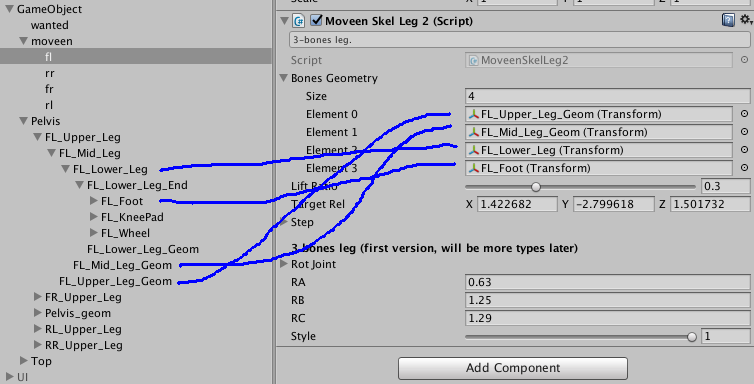
Animated object structure example
- some external
GameObject- Stepper (
GameObjectwithMoveenStepper5)- Leg (
GameObjectwithMoveenSkelLeg1) - Leg (
GameObjectwithMoveenSkelLeg1)
- Leg (
- Body (
GameObjectwtithRigidBody)- Body meshes
- Leg meshes
- Leg meshes
- Target (any
GameObject)
- Stepper (
TODO: hip
Restrictions
- Legs must be contained as children of Stepper
- Stepper must contain 2 or more Legs in its hierarchy